Blog Post By: Yari
Date: July 28th, 2026
It’s Tech Tuesday, girlies!
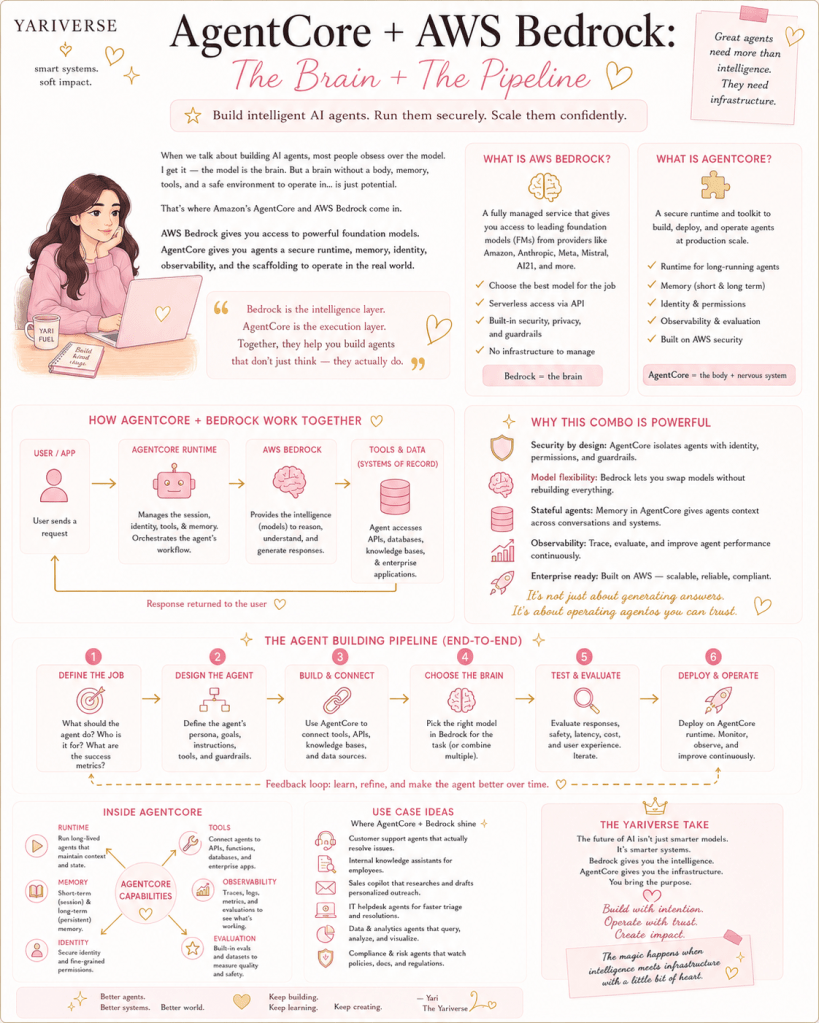
Everyone loves talking about AI agents like they’re tiny digital interns living inside the cloud, wearing little headsets, ready to answer questions, book refunds, look up orders, remember preferences, and somehow emotionally support your enterprise workflow.
Cute, right?
But here’s the thing: AI agents aren’t magical just because they can respond in full sentences. A model can be brilliant and still be useless if it has no tools, memory, permissions, guardrails, observability, or safe way to connect to real business systems.
That is where AWS Bedrock and AgentCore come in.
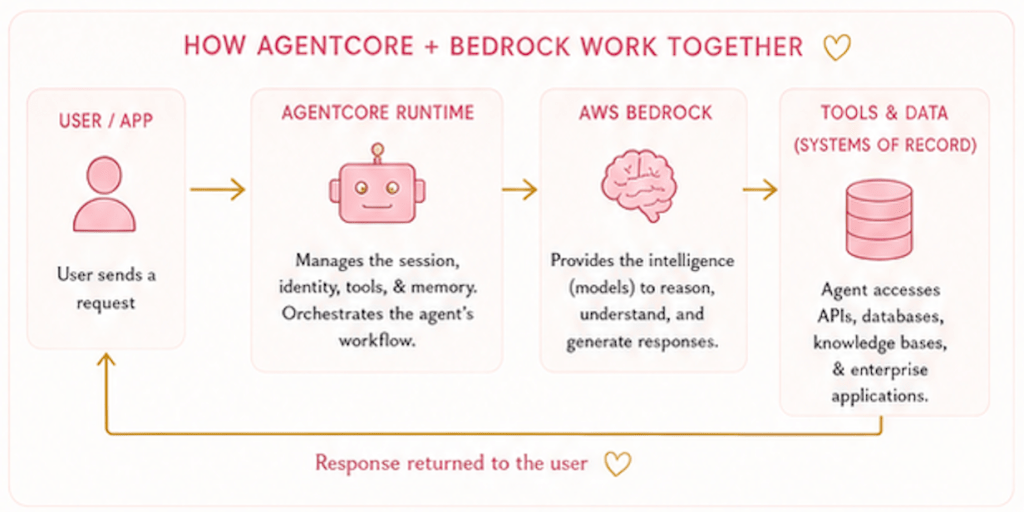
In simple terms:
- Bedrock is the brain.
- AgentCore is the body & nervous system.
- Operations team make sure the brain doesn’t wander into oncoming NYC traffic.
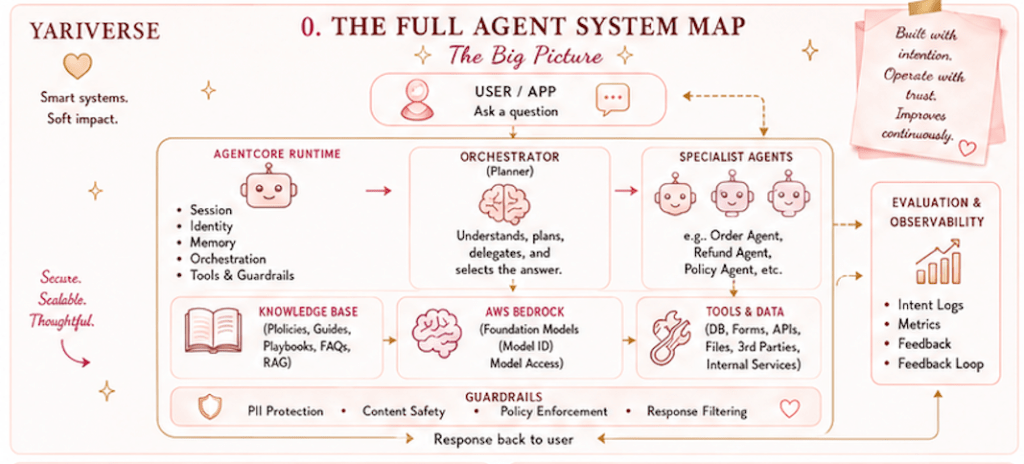
The architecture for a simple model includes:
- A Knowledge base, a pluggable inference layer, shared cloud resources, specialist agents.
- An orchestrator, guardrails, a chatbot UI, and evaluation workflows.
A Simplified AI Powered Customer Support Chatbot
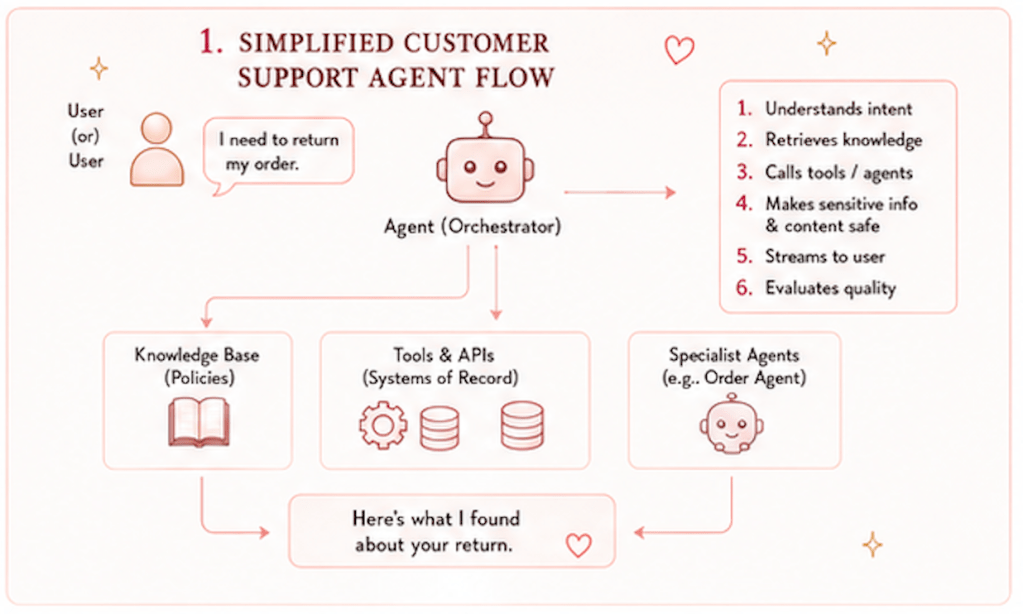
Lets say, we’re building an AI powered customer support chatbot that can:
- Authenticate users, understand their request, retrieve policy knowledge
- Call tools, delegate work to specialist agents, mask sensitive information
- Stream responses into a user interface and evaluate agent quality after deployment.
That’s a lot, I know, but even a simple system like this would include the following:
- Evaluation layer → to score and monitor agent behavior
- knowledge base → for policy documents
- pluggable inference layer → for choosing models
- registry and gateway → for agent discovery and tool routing
- specialist order agent → for order related questions
- orchestrator harness → to manage the conversation and delegate tasks
- guardrail response interceptor → to mask sensitive information
- Streamlit chatbot UI → for the customer facing experience
The knowledge base notebook explains that the refund agent needs to answer policy questions, so it uploads return policy documents to S3, creates a Bedrock Knowledge Base backed by an OpenSearch Serverless vector index, embeds the documents with Titan Text Embeddings V2, and stores the Knowledge Base ID in SSM Parameter Store for runtime use.
That is the first big lesson: agents need knowledge they can retrieve, not just opinions they can generate. A model without grounded knowledge is like a friend who gives confident advice after reading one Pinterest quote. Charismatic, but literally dangerous in the short and long term. Be careful of both.
Bedrock: The Brain Layer
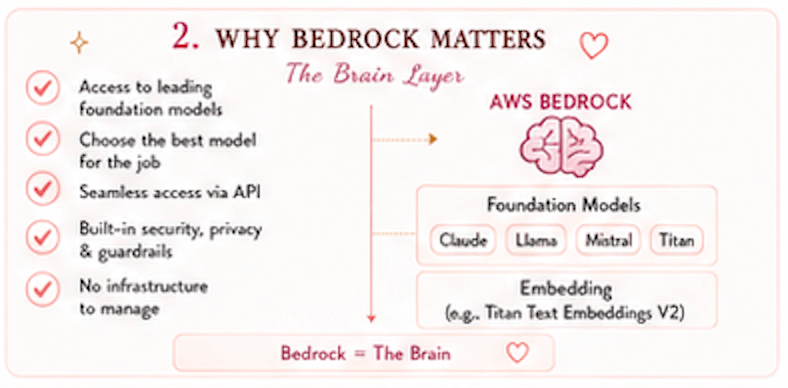
- Bedrock would appear as the place where models and embeddings live.
- The knowledge base uses Titan Text Embeddings V2 to convert return policy documents into searchable vectors.
- The inference layer also describes using NVIDIA Nemotron models, with sub agents using Nemotron 3 Super on Bedrock and the orchestrator using Nemotron 3 Ultra via Baseten through LiteLLM.
Different agents need different kinds of intelligence, in a similar manner how you might learn differently than your bestie.
A simple specialist agent sometimes need speed and reliability. While an orchestrator sometimes need stronger reasoning, since it decides:
- Which agent to call
- When to call a tool
- How to stitch the final answer together.
Think of it like a fashion house girlies,
- Not every person needs to be the creative director.
- Some people cut the fabric, while some handle styling.
- Others manage the runway, and some approve the final look.
The same goes for AI systems: The orchestrator aren’t just answering; it’s coordinating.
AgentCore: The Execution Layer
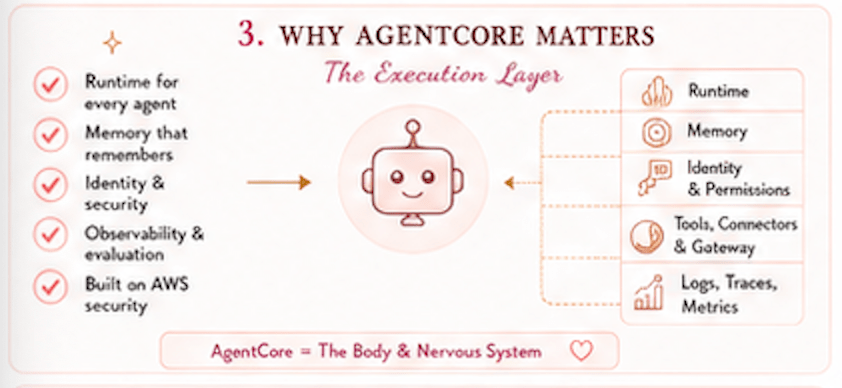
AgentCore is the operational layer that turns model says words → into agent does work.
The setup notebook creates an:
- AgentCore Registry
- AgentCore Gateway
- Cognito authentication.
The registry acts as a centralized catalog where specialist agents can publish themselves, while the gateway routes incoming tool calls with authentication. This is where the system starts becoming like a production.
A demo chatbot can then call a model. However, real chatbot still needs identity, routing, permissions, memory, logs, security, and tool control.
That’s the difference between a cute prototype and something a company can actually operate without someone from compliance asking, who approved this?
AgentCore helps create the environment where agents can be discovered, invoked, monitored, and controlled.
In simple terms:
- AgentCore → gives the agent a job description, a security badge, and a manager.
- Bedrock → gives the agent intelligence.
The Knowledge Base Pipeline: From Documents to Answers
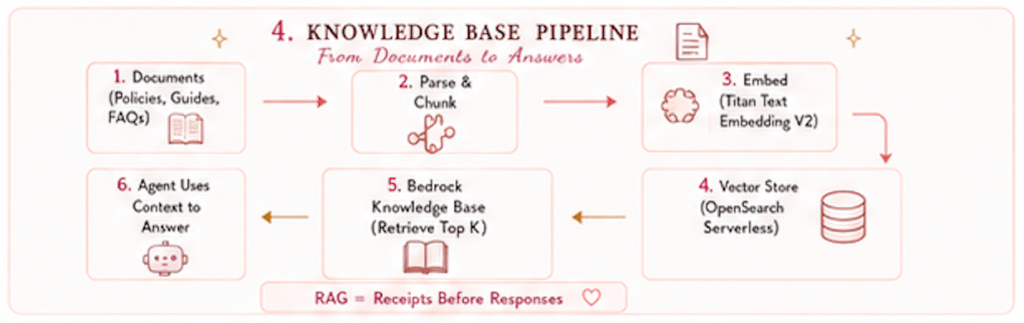
The knowledge base is one of the most important parts of a system like this because it turns static company documents into retrievable context. The flow looks like the following:
- Policy documents go into S3
- The documents are parsed
- Titan Text Embeddings V2 converts the text into vectors
- OpenSearch Serverless stores the vector index
- Bedrock Knowledge Base retrieves ranked passages when a user asks a question
- The refund or support agent uses those passages to answer.
This is the classic Retrieval Augmented Generation pattern, a.k.a RAG. Basically, the model gets receipts before it answers.
Remember, customer support isn’t just a creative writing contest.
- If someone asks: What’s the return window for electronics?
- The agent shouldn’t manifest a policy from the 5th dimension astral plane. It should retrieve the actual policy, read it, and answer based on only that source.
Good AI doesn’t just sound smart → Good AI knows when to look things up.
The Pluggable Inference Layer: Don’t Marry One Model Too Early
One of the smartest parts of this type of project is the pluggable inference layer.
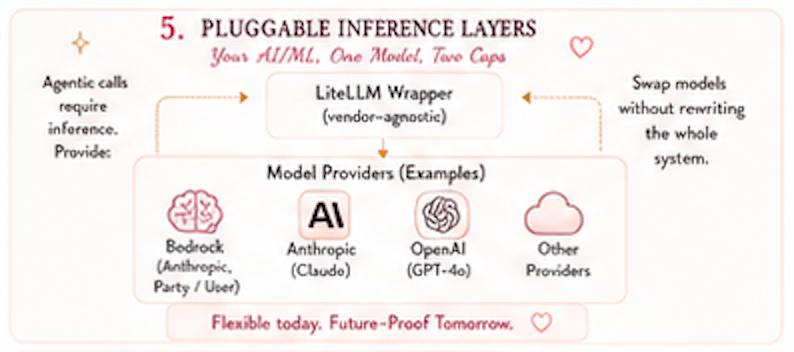
The inference section explains that agents need to call an LLM, but the model choice shouldn’t be hardcoded into every agent. Instead, the notebook builds a thin LiteLLM wrapper that gives every agent a single invoke(prompt) interface no matter which provider is behind it.
Which is excellent product architecture since AI models change constantly. The best models today won’t be the best next quarter. Changes will occur to the pricing, latency, and reasoning quality as well as enterprise contracts. Some models are better for tool use, others for summarization, reasoning and better for please stop hallucinating you need sleep.
A pluggable inference layer means the product isn’t trapped. You can swap the model without rewriting the whole agent system. That’s how you build for change an in AI. Change isn’t a possibility; it’s the default setting.
The Specialist Agent: Give the Agent a Job, not a Personality Disorder
The order agent section would show a clear specialist design. The Order Agent handles order related questions, like looking up a specific order or retrieving all orders for a customer. It uses a Lambda function that queries DynamoDB, exposes the function as an MCP tool through the AgentCore Gateway, deploys the agent on AgentCore Runtime, and registers it so the orchestrator can discover it. Which is exactly how AI agents should be scoped.
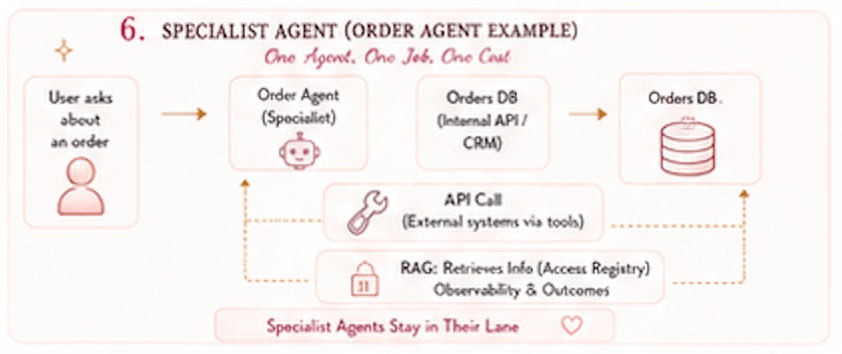
A common mistake is trying to make one giant agent do everything. Which sounds efficient until the agent becomes a chaotic overachiever with no boundaries. A better pattern is:
- One agent for orders.
- One agent for refunds.
- One orchestrator to decide who handles what.
- One gateway to route requests safely.
- One registry so agents can be discovered.
That’s not just cleaner engineering; it’s good product design. Good specialist agents are easier to test, improve, monitor, and explain.
Remember, the goal isn’t one mega agent, the goal is a system where each agent knows its lane.
The Orchestrator: The Friend Who Actually Coordinates the Group Trip
The orchestrator harness is the top level agent of a system like this. It holds the customer conversation, discovers specialist agents through the registry, delegates tasks, uses a model through LiteLLM, and maintains conversation state through AgentCore Memory.
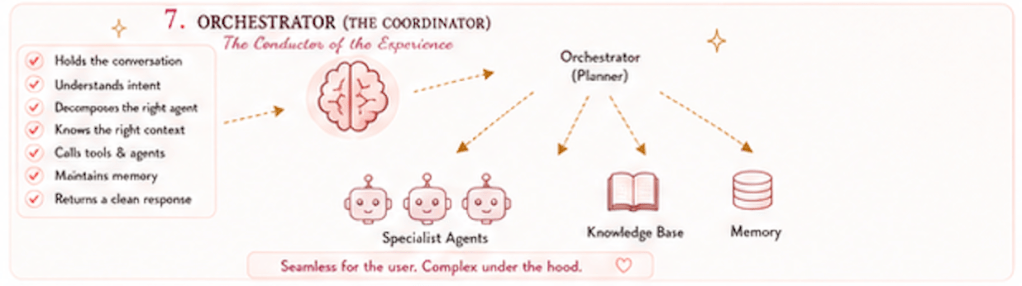
It’s the part of the system that makes the whole experience feel intelligent. The user doesn’t want to know which tool, Lambda function, database, or specialist agent is needed. The user using the customer service tool simply want to ask: Which of my orders are eligible for a refund?
The orchestrator has to understand the intent, know which agent can help, pass along the right identity, retrieve or call the right data, and return a clean response. That’s orchestration.
Basically, it’s like the friend who actually made the dinner reservation, checked everyone’s dietary restrictions, booked the Uber, and sent the calendar invite.
The orchestrator’s the reason the system feels seamless instead of feeling like the user’s being passed between departments.
Memory: Personalized, But Please Keep It Ethical
The chatbot UI would pass the authenticated customer ID as the actorId to the harness so long term memory would be scoped per user. It allows memory such as preferences and past session summaries to stay tied to the correct person. Memory makes agents better as they don’t have to start from zero each time.
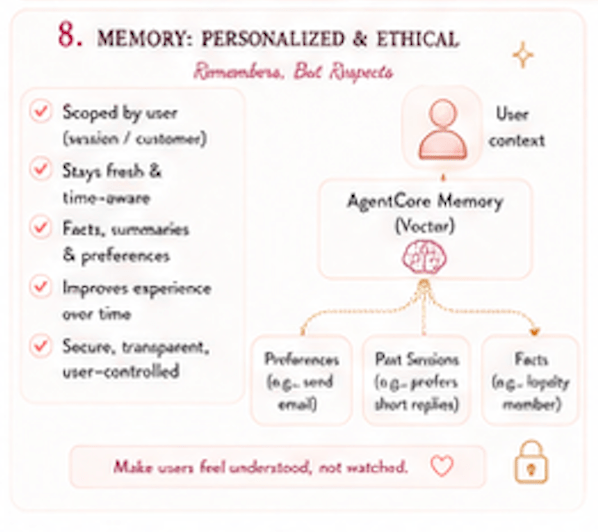
A customer who previously would’ve stated that they preferred email updates, shouldn’t have to repeat that forever like some cursed customer service spell.
Memory creates privacy responsibility since the best version of memory is:
- Scoped to the right user, Transparent, Limited to useful context
- Secure, Editable or removable without be creepy
Memory should make the user feel understood, not watched. That difference is consent, clarity, and control.
Guardrails: Cute Systems Still Need Boundaries
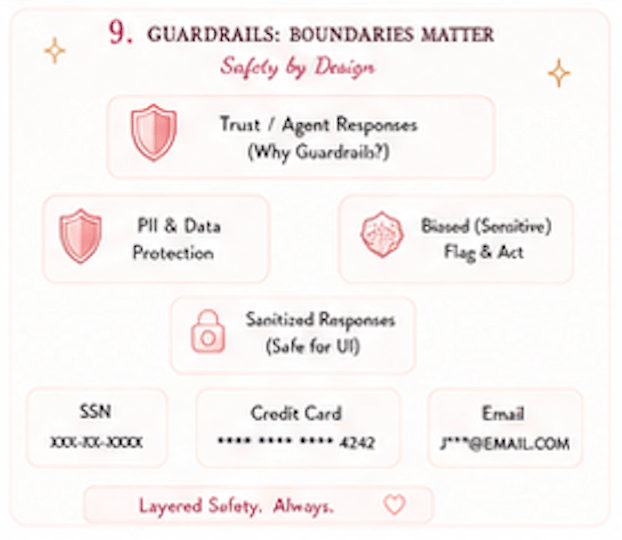
The guardrails section would deploy a NeMo Guardrails response interceptor on the AgentCore Gateway. Its job would be to detect and mask personally identifiable information, or PII, in tool responses before that information reaches the user facing output. It uses Nemotron as an LLM based PII detector rather than relying only on regex patterns. Which is one of the strongest parts of the architecture. As the tool responses can contain sensitive information since customer records include:
- emails, addresses, order details, account identifiers, and other personal data.
Without guardrails, the agent accidentally exposes risk. The chatbot code should also include a practical safety layer of a local redact_sensitive() function that masks:
- SSNs, credit cards, and email addresses before streaming responses into the UI.
Remember, fancy AI architecture is great, but sometimes regex still has to show up in flats and do the work. A good system can use both:
- LLM based detection for context sensitive PII
- Rule based redaction for obvious sensitive patterns
Security isn’t just one feature. It’s layered, like a good skincare routine but for data leaks.
The UI: Where Infrastructure Becomes a Product
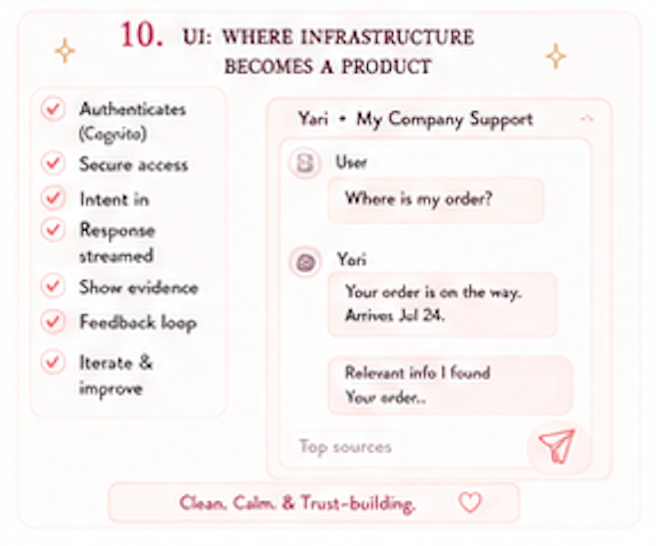
The Streamlit chatbot would be the user facing layer in this type of project. The uploaded app would authenticate users through Cognito, extracts claims like customer ID and tier, creates a session ID, displays chat history, provides prompt buttons, and stream the orchestrator response token by token into the chat bubble.
Which means users don’t experience your architecture diagram, just the interface. A great backend with a confusing UI (User Interface) is like a luxury hotel with a haunted elevator. Technically impressive, but unsafe. The UI does several important things like:
- Authenticate the user, show account context, let the user ask questions naturally
- Stream responses so the experience feel responsive
- Show visible tool status when appropriate
- Hide internal tools that the customer does not need to see
The code hides internal scaffolding tools like shell, browser, code interpreter, and registry tools so the customer doesn’t see unnecessary operational noise.
Remember, good AI UX doesn’t show every gear turning. It shows enough transparency to build trust without making the user feel like they accidentally opened the engine room.
Evaluation: The Agent Needs a Report Card
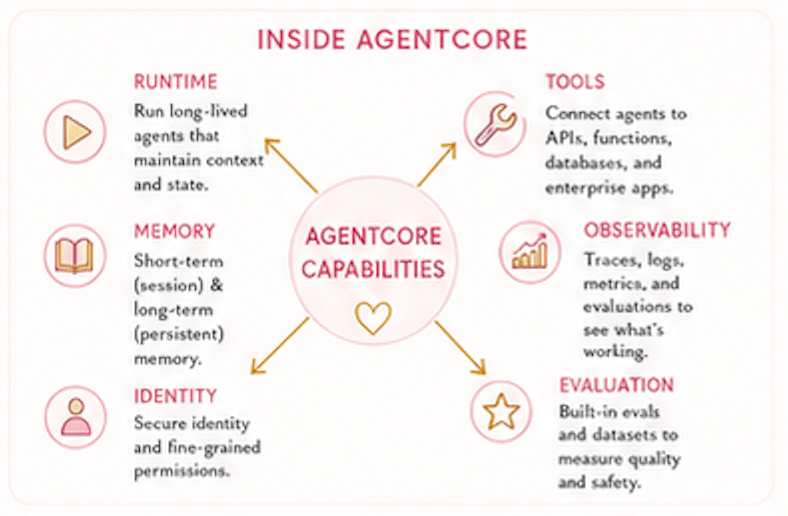
The evaluation section would show how deployed agents can be scored with Amazon Bedrock AgentCore Evaluations using built-in LLM judges, custom LLM-as-judge setups, or custom code-based Lambda evaluators. It also covers different evaluation modes, including on-demand, online, batch, dataset, and simulation.
This is essential since a lot of AI demos stop at it answered but Production AI asks:
- Was the answer: Correct? Safe? Grounded? Fast enough?
- Did it: Use the right tool? Leak anything? Follow policy? Improve or regress?
Evaluation is how you prevent your agent from becoming a confident intern with admin privileges.
The evaluation layer helps teams monitor quality, run regression tests, discover edge cases, and improve the agent over time, because building the agent is only half the story, operating it is the actual plot.
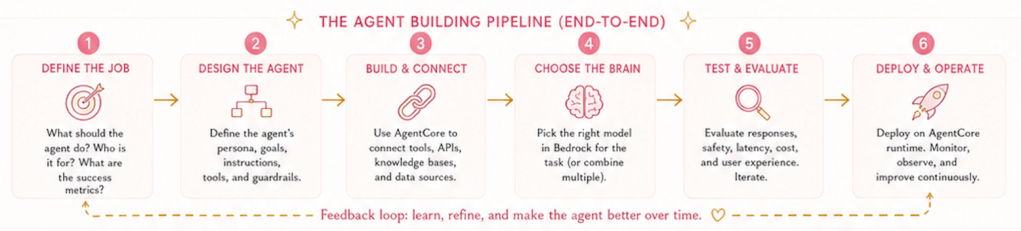
The Agent Pipeline in 6 Steps
This is the abstract pipeline analytical engine. You’ll need to familiarize yourself with this when you apply to that quant job.
Step 1: Set Up the Knowledge Layer
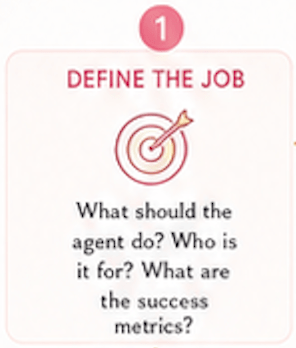
Upload company documents into S3, embed them, store them in a vector index, and connect them to Bedrock Knowledge Base. It gives the agent something reliable to retrieve, without the agent having to guess.
Step 2: Choose the Model Layer
Use Bedrock and LiteLLM to make model access flexible.
The key architectural move isn’t hardcoding one model everywhere. Instead, the system creates a provider agnostic interface so different agents can use different model backends. That’s how you future proof your AI stack.
Step 3: Build Shared Infrastructure
Create the registry, gateway, authentication, permissions, and shared resource IDs. The boring sounding layer that makes everything real, no one claps for infrastructure until it breaks. Then suddenly everyone becomes religious about architecture.
Step 4: Deploy Specialist Agents
Build focused agents for specific jobs, like order lookup or refund support. Each agent gets tools, permissions, runtime deployment, observability, and registration. It keeps the system modular instead of forcing one agent to become the entire customer service department.
Step 5: Orchestrate the Experience
Use the harness to manage the conversation, memory, routing, and delegation. The orchestrator understands the request, discovers the right specialist, sends the right context, and returns a final response.
It’s where the system starts feeling like one seamless assistant instead of a pile of notebooks holding hands.
Step 6: Guard, Stream, Evaluate, Improve
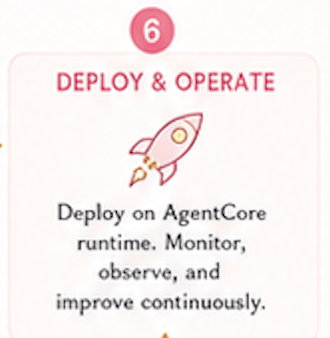
Add guardrails for PII, stream responses into the UI, log traces, and evaluate agent quality.
This is how the system becomes safer, more usable, and more production ready.
The loop is simple: Build → Run → Observe → Evaluate → Improve.
Why This Helps in Building Real AI Systems
A project like this teaches the difference between AI as a demo and AI as infrastructure.
A system knows who is asking, retrieves the right context, uses the right tool, respects permissions, protects sensitive data, logs what happened, and gets evaluated afterward.
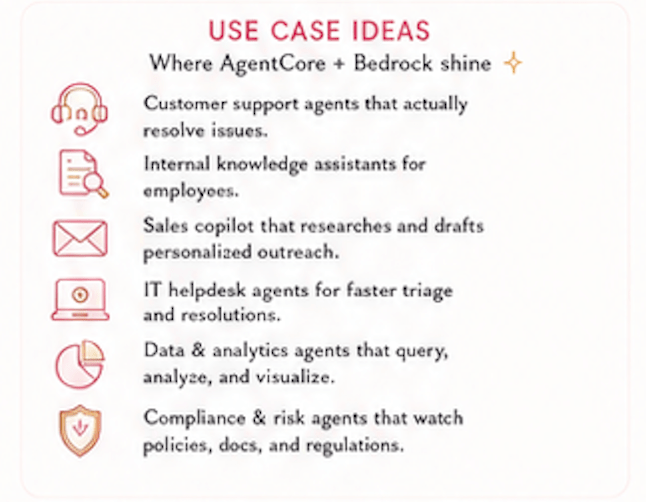
That is a completely different maturity level. This architecture helps teams build:
- Customer support agents, Internal knowledge assistants, Sales copilots
- IT helpdesk agents, Data and analytics agents, Compliance review agents
- Operations workflow agents, Policy lookup tools, Enterprise chatbots with memory and permissions
The pattern is reusable because most production AI systems need the same core ingredients:
- A user interface, Identity and authentication, A model layer
- Knowledge retrieval, Tools and APIs, Specialist agents
- Orchestration, Memory, Guardrails, Observability, Evaluation
This is an abstract pipeline, the code for this will not be provided.